
✅ 8K IPTV – Enigma2 (E2) User List Page (Manage IPTV Accounts)

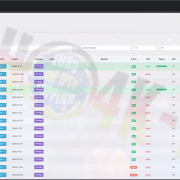
The Enigma2 User List Page is a complete dashboard for resellers and admins to view, manage, and track all Enigma2 IPTV subscriptions. It provides detailed information about active and inactive accounts, subscription types, expiration dates, STB connections, and user activity—all in one organized interface.
This page ensures quick access to user data, enabling efficient management of multiple accounts and streamlined monitoring.
Key Features:
✔ Comprehensive User Overview
View all E2 accounts with details such as MAC address, subscription type, package, notes, reseller, STB usage, speed, and online/offline status.
✔ Search & Filter Options
Quickly search for users by username, MAC, or package. Filter accounts by reseller, status, or country for easy account management.
✔ Subscription & Package Tracking
Monitor package assignments, VOD access, and bouquet selections for each user. Identify active, inactive, or expired subscriptions instantly.
✔ STB & Speed Monitoring
Track connected set-top boxes (STBs) per user, viewing online status, speed, and concurrent connections.
✔ Expiration & Demo Management
Easily monitor expiration dates and demo ticket usage. Quickly identify accounts that need renewal or trial extension.
✔ Notes & Account Details
Add or view custom notes per user for easier tracking and personalized management.
✔ Full Reseller Integration
All E2 accounts are synced with the reseller dashboard, allowing real-time monitoring and management of multiple users across different resellers.
🔥 FAST SUPPORT & ACTIVATION – CONTACT US DIRECTLY
For instant line support, subscription updates, or account troubleshooting, use:
✔ WhatsApp – VERY FAST RESPONSE ⚡
✔ Telegram – VERY FAST RESPONSE ⚡
✔ Website Chat – Fast Support
Direct contact ensures immediate assistance and resolution.



Leave a Reply
Want to join the discussion?Feel free to contribute!